
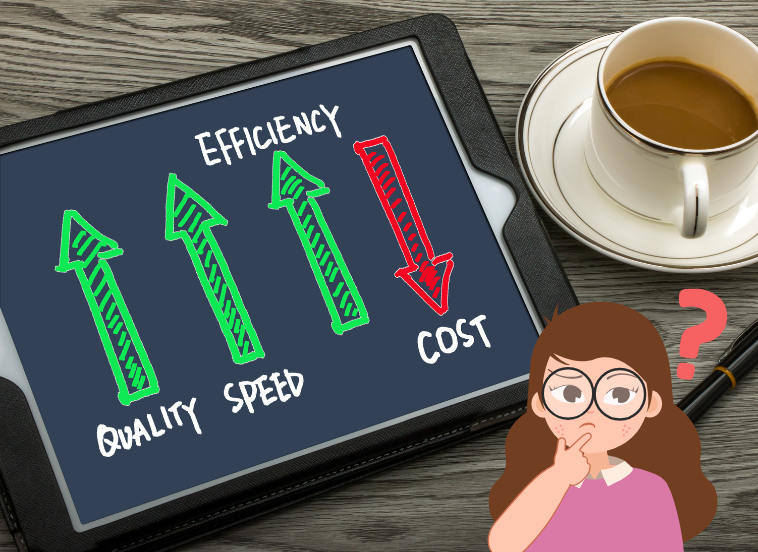
New devices reduce the total cost of ownership.

The Hidden Cost of Waiting: Why Regular Device Refreshes Are No Longer Optional

There’s something odd going on in businesses all across America. Decision-makers who wouldn’t hesitate to replace a failing delivery truck or leaky roof typically balk at refreshing the very devices their teams rely on daily. The computer that sits on an employee’s desk, now in its seventh year of use? Invisible infrastructure — until it isn’t.

The fact is device refresh programs have changed from a luxury being implemented by IT into an essential business practice. The issue isn’t whether or not companies/organizations should upgrade their hardware on a regular basis, but the fact that what they’re risking by doing so is postponing the inevitable.

The Illusion of Savings

When finance people look at the line item of new computers, their initial (and straight-forward) response is warranted. Why pay for devices that are still turning on? The monitors still display. The keyboards still click. On the surface, and from a functional standpoint, these look alright. This logic, however, is one of the costliest myths in contemporary business management. The cost of new hardware is visible and blinds decision-makers to the unseen hemorrhaging throughout their organization. Every day an old machine is still being used levies a tax on productivity, security, and employee morale that dwarfs the already-depreciated value of that computer.

Think of the employee who comes to work 15 minutes before their shift — because that’s how long it takes for their computer to boot properly. Consider the designer who stares at the spinning wheel of death as she renders files that new hardware would have handled in seconds. Consider the salesperson who apologizes to colleagues on video conferences because their ageing processor is insufficient to support conferencing software without overheating. These aren’t isolated incidents. They are the daily reality at businesses stuck with old refresh cycles or, worse, no refresh strategy.

The Three-to-Five-Year Window: Where Science Meets Economics

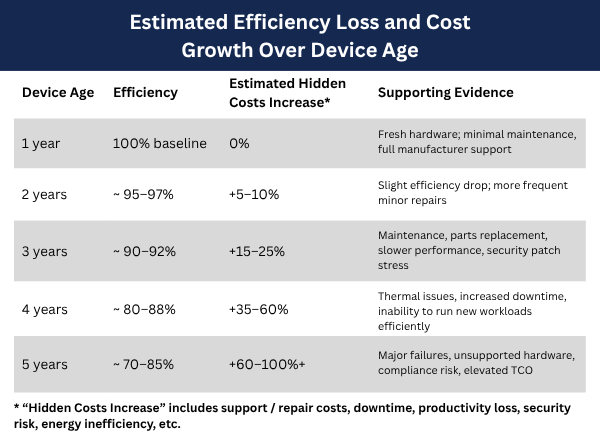
Chart of Estimated Efficiency Loss and Cost Growth Over Device AgeThe long-term industry analysis tells us that a three- to five-year refresh cycle is the right balance between performance, security, and total cost of ownership. This isn’t arbitrary. It compromises the intersection of aging hardware, changing software, and security exploit timelines.

Planned obsolescence in the built-in lifespan of contemporary business tools can be approximated to this period. Suppliers produce their parts to work well for around 3 years of business use. Beyond this level, the degradation increases at an exponential and not linear rate. A four-year-old device doesn’t suffer a little performance reduction compared to the three-year-old one — it’s like 15% worse.

The problem is intensified by the rapid pace of software development. Operating Systems, business applications, and security software all change quickly, and each new version requires more processing capacity, RAM, and storage. A 2020 device is built to deal with 2020 software demands. By 2025, the same device is buckling under the weight of modern applications, though the hardware itself is still technically functional.

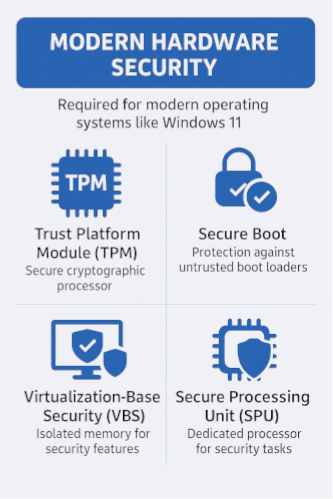
Security concerns provide a crucial additional dimension. Hardware-based security functions, such as Trusted Platform Module technology and Secure Boot capabilities, are now a must-have in today’s digital landscape, as businesses incur, on average, millions of dollars in damages and recovery costs following an IT breach. “Devices that don’t have these fundamental characteristics built in from the beginning can never be properly secured, no matter how great the security software.
The Productivity Paradox

The problem is that most companies don’t realize how obsolescence, whether it’s the result of breaking down or no longer being cost-efficient to maintain, can really add up over time; its effects get spread out so widely across a company and not all at once, as with a total system failure. And this is almost entirely invisible to the world of traditional accounting.

Consider when an employee is forced to wait an additional two minutes for their computer to boot each morning, that’s about eight hours lost a year per person. When apps freeze for thirty seconds a half-dozen times a day, it erodes employee morale and productivity. It’s moments like these that add up to weeks of collective productivity lost waiting for old hardware to keep pace with new demands.

Employees who work with frustratingly slow equipment are more stressed at work, less satisfied in their jobs, and are less engaged. By giving them outdated tools, the unspoken message businesses are sending is that it doesn’t value them or their time enough to invest in decent equipment. This affects retention, recruitment, and company culture in ways that aren’t directly reflected on balance sheets, but affect business outcomes immensely.

High-performing employees often experience this friction the most. The best talent often has a low tolerance for working with tools that drag down their productivity. When a business’s technology gets in the way rather than helping, the organization’s best workers start seeking other places where they can spend less time waiting and more time being productive.

Security: The Non-Negotiable Imperative

The world of security has changed over the past 10 years. Cyber attacks can bring an organization to a screeching halt for months. The computers your employees work on every day are the first line of defense — or the weakest link.

Legacy hardware, built before modern security protocols, is still very common in businesses and cannot be upgraded to accommodate modern security needs. Software patches and firmware updates can only do so much when the root hardware is missing basic security. Businesses using computers five years old or older are essentially trying to protect themselves against modern cyber threats with a suit of rusty armor.

Compliance requirements have similarly evolved. Between healthcare and financial services, there is an increasing number of stringent rules about data protection and system security. Most of these regulations now specifically require hardware-based security capabilities, which older systems can not be retrofitted with. Not only is running out-of-compliance hardware a security risk, but it can also be a legal and financial liability. The price of one single breach is more than it takes to refresh an entire company’s fleet multiple times.

However, companies still gamble that old hardware will remain in service for another year. That’s a denial of the basics of risk management. It’s not a matter of if antiqued hardware will lead to a security incident, but when.
The Remote Work Revolution

The more dramatic move to remote and hybrid work models has completely changed the computer refresh equation. When employees were largely working in sheltered office environments with strong IT support, aging devices could be maintained via hands-on troubleshooting and workarounds. That model has collapsed.

Remote workers rely on their computers to work without the need for hands-on troubleshooting. A computer dying in a home office doesn’t translate to ducking around the corner into IT for five minutes — it’s several hours or days of lost productivity, while arrangements are made for repair or replacement. Meaning the price to pay for a computer failure has increased exponentially in our distributed world. Furthermore, remote computers are subject to different usage behavior from their office-bound counterparts. Laptops that once spent most of their time in climate-controlled offices safely docked at desks are now carried around every day. This high-wear cycle prematurely ages equipment when used outside typical office environments.

The security impact of remote working pushes refresh timeframes even tighter. Threat exposure is increased for computers running outside a company’s protected networks because they are constantly connecting to different networks with widely varying levels of security. A computer’s hardware security becomes even more important to protect it. Organizations that allow remote work that do not enforce hardware with modern security features and security software monitored are at increased risk of a security breach.

The Total Cost of Ownership Calculation

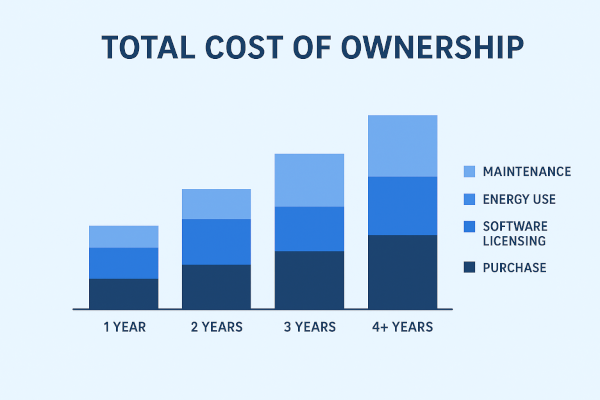
Total Cost of Ownership ChartCosts to support and maintain computers increase significantly as they age. Problems occur more often, requiring time to diagnose and fix issues. As manufacturers phase out support for older models, spare parts are harder to find and more expensive. IT is forced to spend more time and effort on maintaining old equipment, resulting in missed opportunities for strategic projects that could provide business value.

There’s another cost that is less visible, even though it amounts to a lot of money, and that’s energy use. Older units often draw much more power than today’s energy-efficient models. The money saved on electrical bills alone for devices in a fleet of hundreds can often justify refresh investments, especially as the cost of energy keeps increasing.

Software licensing must also be considered. Many recent software packages are subscription-based and assume users have reasonably up-to-date hardware. Organizations with outdated devices risk not being able to take advantage of modern software and being stuck on unsupported software that’s inferior to its modern counterpart. Add manufacturing and security issues – as well as employee satisfaction – together with the productivity losses, and having a planned refresh cycle is a no-brainer. The perceived cost savings of extending a device’s life cycle vanish when subjected to a thorough total cost of ownership analysis.
Planning the Strategic Refresh

Device refresh success needs to be more than just buying new equipment every 2-3 years. It requires a structured program for planning and investing in technology while minimizing the disruption to the business.

The foundation of any refresh plan starts with a complete inventory and evaluation. Organizations have to know what devices are in use, how old they are, their condition, and their business criticality. This visibility facilitates strategic prioritization, so they know which devices require immediate attention.

Having predictable refresh cycles is great for budget planning. Instead of suddenly absorbing capital expenditures when devices fail outright, companies can more predictably budget for ‘as-needed’ to support planned refreshes. This financial certainty helps in managing cash flow and permits organizations to gain from volume purchase discounts or favorable financing terms.

Pilot programs are an invaluable risk mitigator. Trying new models with a small subset of devices before full-scale deployment helps detect compatibility issues, software conflicts, and any disruptions to staff workflow while they’re still manageable. This incremental approach prevents issues at the organization level that would result from rushed or unverified deployments.

Phased rollouts further minimize disruption. Meanwhile, replacing all of a company’s devices at once is ill-advised. Staged deployments enable IT to ensure business continuity while supporting users. By restricting the deployments to a reasonable percentage of the device fleet, if something goes wrong, staged deployments only affect a minority of the workforce, as opposed to breaking operations across the board.

The Environmental Dimension

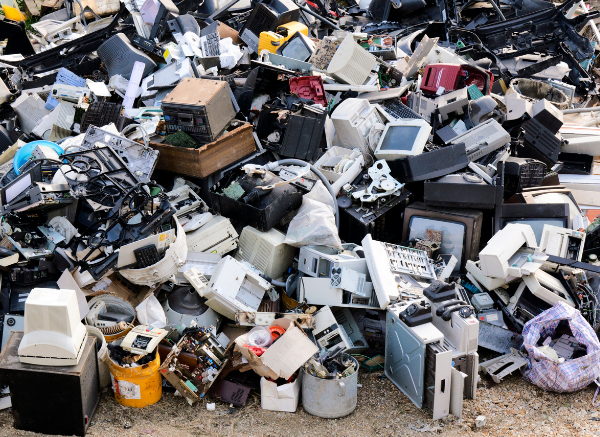
e-wasteThe new device refresh strategy is also an ecological one. E-waste is one of the fastest-growing waste streams in the world, and businesses are under increasing pressure both ethically and legally to deal with disposing of devices responsibly.

Any refreshing strategy would also take into account secure and safe disposal paths that offer data destruction, which might come with a recycling opportunity. A lot of modern devices contain enough valuable materials that recycling them is an environmentally friendly option for disposal. Those who overlook this aspect are both risking reputational damage and potential regulatory fines, as e-waste laws continue to be tightened.

One strategy for refreshing devices involves donation programs that get a few more years out of devices and benefit local charitable organizations. Old devices can still be useful for schools and non-profits. This method links social responsibility with environmental responsibility, garnering respect for the donation while seeing that donated devices are disposed of correctly.

The Competitive Advantage

In an environment where technology underpins almost every aspect of business, device refresh strategies have developed as competitive differentiators. Companies that provide their employees with up-to-date, dependable tools move faster, more securely, and with greater efficiency than competitors clinging to old hardware.

An organization that adopts new technology can implement improved workflows that depend on having up-to-date technology in place as a foundation. Aging technology limits choices: organizations are not able to take advantage of opportunities that require current hardware to function properly.

This competitive dimension is amplified by recruitment and retention. Elite Talent expects modern equipment to allow them to perform at their best. Organizations offering outdated, frustrating tools convey that they are behind the curve technologically and thus are less able to attract and retain productive employees, whose skills help drive business success.

Moving Forward

Refresh Cycles are a Cost of Doing Business, Not an IT Nice-to-Have. Organizations that understand this fact and develop refresh strategies that are well-considered and systematic will set themselves up for success, while those who put off refreshes build up technical debt that eventually comes due with interest.

Business leaders shouldn’t be asking if they should regularly refresh devices, but rather how to deploy device-refresh strategies that meet their operational requirements, budget limitations, and strategic goals. The price of stagnation—in terms of lost productivity, an increased threat landscape, employee morale, and competitive positioning—far outweighs the cost to manage a modern and capable device fleet.

At the end of the day, devices are not objects that employees simply use to get their jobs done. They are the bedrock on which modern business stands. Disregarding that foundation isn’t a way to save money — it’s a formula for eventual catastrophic and costly failure. For all the importance of insurance policies, though, it’s the refresh cycle that ensures businesses can run smoothly and securely operate in a world increasingly reliant on advanced technology.

Spread the love
Share the Post:
Read More